Personal app · Next.js · TypeScript · Vercel
Ledger
A salary and budgeting app I built for my own use. Designed directly in code, never in Figma, and I’ve been using and improving it for two months.
How I work in Figma
I’ve used Figma since day one, 7+ years now. I build design systems where every value is a reference, so engineers get code that matches the design, not an approximation of it.
01
Developers can connect their favourite AI agent to Figma over MCP and get pixel-perfect code.
Designers used to spend reviews arguing about why the build wasn’t pixel-perfect. With that out of the way, the conversation moves to what matters more: better interactions, micro-interactions and animation that guide and delight users.
01
Figma design
Tokens, auto layout, constraints
02
MCP
Agent reads the real structure
03
Developer’s AI agent
Whichever they prefer
04
Production code
Responsive, mapped to tokens
02
A live widget from my team’s library at Dialog: W0015, the product configuration widget, open in Figma.
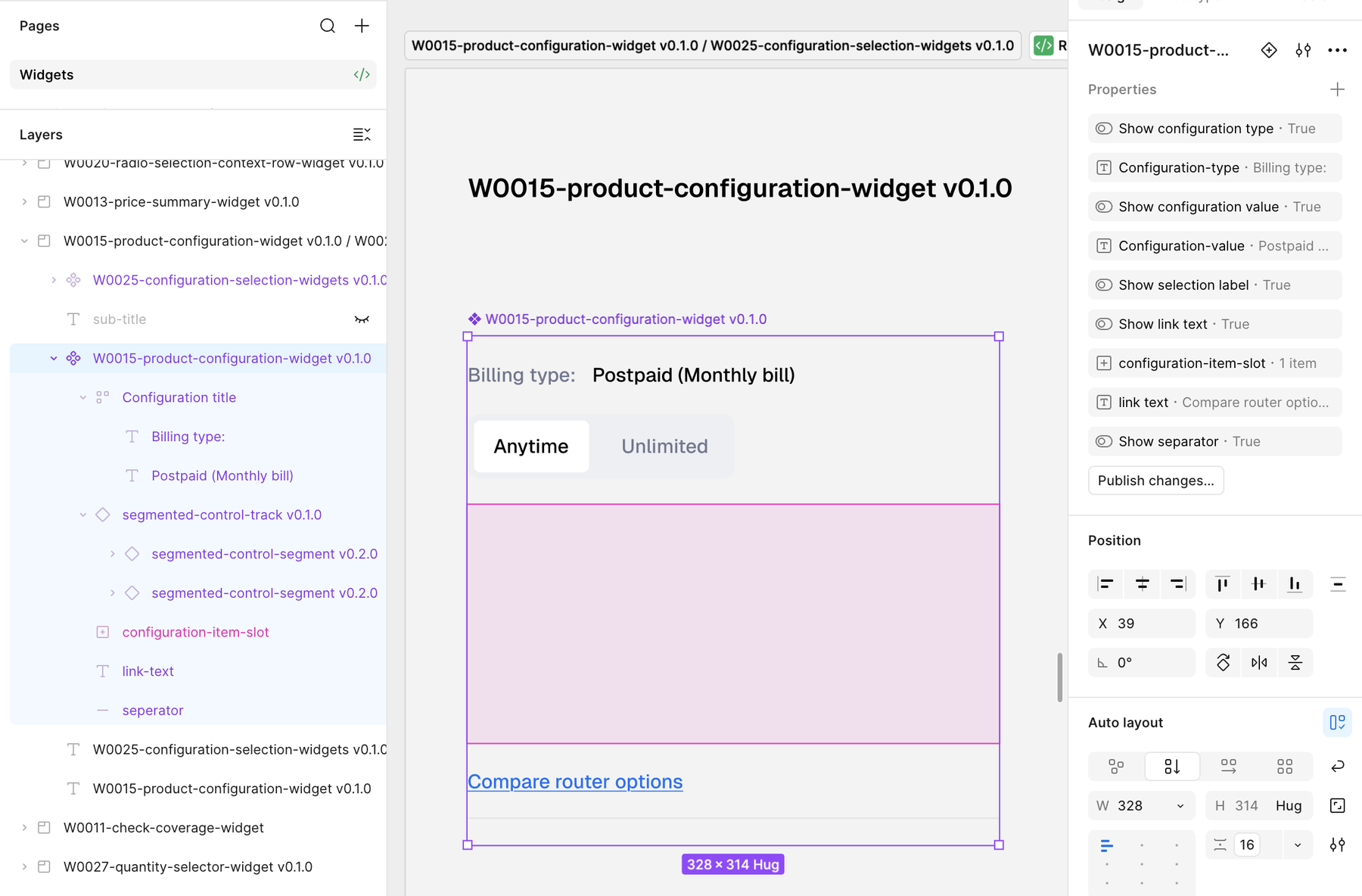
ID and version
W0015 v0.1.0. Every widget is catalogued and versioned, like a code package.
Versioned building blocks
The segmented control track (v0.1.0) holds segments at v0.2.0. Each layer updates without breaking the one above it.
Properties that become code props
5 on/off switches and 3 text properties, named the way a developer would name them.
A slot for other widgets
configuration-item-slot takes W0025, the configuration selection widget, without detaching anything.
Auto layout throughout
Vertical stack, 16 spacing, fixed 328 width, height that hugs its content.
The same widget, as a developer uses it
<ProductConfiguration
  showConfigurationType
  configurationType="Billing type:"
  showConfigurationValue
  configurationValue="Postpaid (Monthly bill)"
  showSelectionLabel
  showLinkText
  linkText="Compare router options"
  showSeparator
>
  <ConfigurationSelection />   // W0025 in the slot
</ProductConfiguration>
Illustrative. Every property in the Figma panel carries straight across.
This is what an AI agent reads over MCP. Nothing to interpret.
03
I started as a design engineer: Android native before AI, React Native with it, and front-end prototyping for the web. I know what a developer expects to find in a design file, so code-ready design isn’t extra work for me. I still ship code today as a hobby.
Personal app · Next.js · TypeScript · Vercel
A salary and budgeting app I built for my own use. Designed directly in code, never in Figma, and I’ve been using and improving it for two months.
E-commerce · Storefront and admin panel
An online store I designed and built end to end: the storefront customers shop on, and the admin panel behind it that runs the business.
04
Components and slots
Flexible building blocks with variants and swappable content.
Auto layout
Every frame resizes the way the real layout will.
Variables
Colour, spacing, radius and type as tokens, with modes.
Styles
Text, effect and colour styles built on top of variables.
Libraries
One source of truth, published to every team file.
Prototyping
Realistic flows for testing and for stakeholder demos.
FigJam
Workshops, journey maps and research synthesis.
Figma Make (AI)
Fast, working prototypes from prompts and designs.
Figma · Design work samples
See the files for yourself
Mixed of designs that I did, Concepts, Freelance work and Dialog work
Main case study
A scalable KYC module for a TRCSL-regulated telco